

Beyond the preset questions, you can write your own. This guide covers adding, editing, and removing custom questions. For the rest of the survey page's settings, see Customizing the Survey Page.
Where to find them
On the Survey page tab of your app settings, scroll past the preset
questions table to Custom questions. This is also where you'll edit or
delete a custom question later, and where the count against your plan's limit
(shown as 1/5 here) lives.

Click Add custom question to open the question builder, or Edit on an existing row to change it — both use the same form described below.
Question types
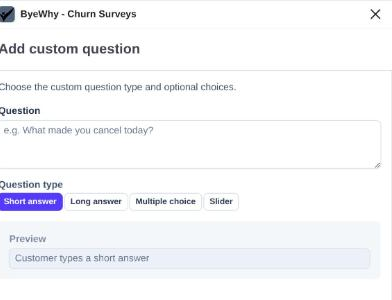
Short answer / Long answer
The simplest types: a single-line or multi-line text box for the customer to type a free-form response. There's nothing else to configure — just write the question.
Multiple choice
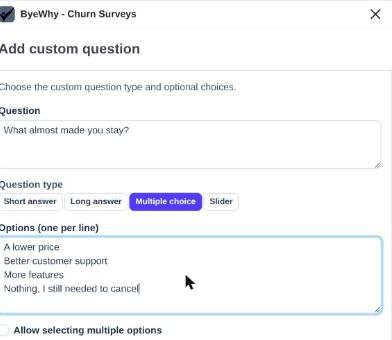
Add your own answer options, one per line. Check Allow selecting multiple options if customers should be able to pick more than one; leave it unchecked for a single-select question.
Slider
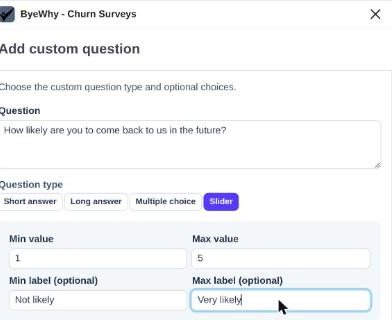
A numeric scale from a min to a max value. The min/max labels are optional captions shown at each end of the slider (for example, "Not likely" / "Very likely") to make the scale's meaning clear without changing the numbers themselves.
A few things to know
- Each account is allowed up to 5 custom questions. You can change these as often as you like. The
(1/5)next to Custom questions shows how many you've used. - Like preset questions, each custom question can be toggled Enabled or Disabled from its row in the table without deleting it.
- Deleting a custom question is permanent — use Disabled instead if you might want to bring a question back later.
- Keep the whole survey (preset + custom questions combined) to five questions or fewer for the best completion rates.